OKR Template (Copy & Paste): Objectives, Key Results, and Weekly Check‑Ins (With Examples)
Last updated: January 2026 • By Abdulbatin Anaza
After implementing OKRs across different team structures and individual projects over two years, I found that most frameworks fail not because the concept is flawed, but because templates become overcomplicated. When working with this planning method on quarterly cycles, the versions that stuck were ruthlessly simple: one objective, 3-5 measurable key results, and a 10-minute weekly update routine.
Here’s what works: an OKR template with clear objectives (what you want to achieve), specific key results (how you measure success), and weekly progress tracking that takes under 15 minutes. This works for teams, individual contributors, students, and freelancers. I’ll show you both the Google Sheets version with automatic scoring formulas and a printable one-page format, plus real examples and the mistakes that derail most OKR implementations.
What OKRs Are (And What They’re Not)
OKRs (Objectives and Key Results) originated at Intel in the 1970s and became widely known through Google’s adoption in the late 1990s. The framework separates direction from measurement.
The three components in your OKR template:
- Objective: Qualitative, inspiring goal (short phrase, clear direction, meaningful). Example: “Build a product users love and recommend”
- Key Results: Quantitative outcomes that prove you achieved the objective (3-5 numbers with targets). Example: “Increase NPS from 32 to 50” or “Reduce churn from 8% to 4%”
- Initiatives: Specific projects or experiments you’ll try to move key results (these go in your weekly plan, not the OKR template itself)
What OKRs are not:
- Not a task list with deadlines
- Not annual performance reviews (use separate processes for compensation)
- Not rigid commitments where missing 100% means failure
- Not replacements for project management tools
According to the history documented on Wikipedia, OKRs work best when objectives are ambitious enough that reaching 60-70% represents strong performance, not underachievement.
When to use an OKR template:
- Quarterly planning for teams or personal projects
- Aligning multiple people toward shared outcomes
- Measuring progress on strategic initiatives (not routine operations)
- Learning what moves important metrics vs. what just keeps you busy
OKR Template Options (Copy and Customize)
One-Page Printable OKR Template
Copy this into Google Docs or print for quarterly planning sessions. Fill it out once per quarter, update weekly.
OKR TEMPLATE — Q1 2026

TEAM/OWNER: ________________   PERIOD: Jan 1 - Mar 31, 2026

━━━━━━━━━━━━━━━━━━━━━━━━━━━━━━━━━━━━━━━━━━━━━━━━━━━━━━━

OBJECTIVE (qualitative, inspiring, clear)
O1: ___________________________________________________________

KEY RESULTS (3-5 measurable outcomes with targets)

KR1: [Metric] from ____ to ____ by Mar 31
     Owner: ____________  Current: ____  Status: ☐ On track  ☐ At risk  ☐ Off

KR2: [Metric] from ____ to ____ by Mar 31
     Owner: ____________  Current: ____  Status: ☐ On track  ☐ At risk  ☐ Off

KR3: [Metric] from ____ to ____ by Mar 31
     Owner: ____________  Current: ____  Status: ☐ On track  ☐ At risk  ☐ Off

(Optional KR4, KR5)

━━━━━━━━━━━━━━━━━━━━━━━━━━━━━━━━━━━━━━━━━━━━━━━━━━━━━━━

WEEKLY CHECK-INS (update every Monday, 10 minutes)

Week 1 (Jan 6):  KR1: ___%  KR2: ___%  KR3: ___%
Notes: _________________________________________________________

Week 2 (Jan 13): KR1: ___%  KR2: ___%  KR3: ___%
Blocker: _______________________________________________________

Week 3 (Jan 20): KR1: ___%  KR2: ___%  KR3: ___%
Next bet: ______________________________________________________

Week 4 (Jan 27): KR1: ___%  KR2: ___%  KR3: ___%

[Continue through Week 12]

━━━━━━━━━━━━━━━━━━━━━━━━━━━━━━━━━━━━━━━━━━━━━━━━━━━━━━━

END-OF-QUARTER REVIEW (April 1)

Final Score (0.0-1.0): ______

What worked: ___________________________________________________

What didn't: ___________________________________________________

Next quarter focus: ____________________________________________
Google Sheets OKR Template with Formulas
This version auto-calculates progress and weighted scores. Useful when tracking multiple objectives or team-wide OKRs.
Create the spreadsheet:
- Open Google Sheets
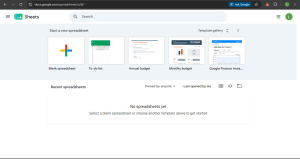
- Create new spreadsheet, name it “OKRs Q1 2026”
- Set up column headers in row 1:
- A1: Objective
- B1: Key Result
- C1: Baseline
- D1: Target
- E1: Current
- F1: Progress
- G1: Weight
- H1: Weighted Score
- I1: Owner
- J1: Status
- K1: Notes
Sample data (paste into row 2):
| Objective | Key Result | Baseline | Target | Current | Progress | Weight | Weighted | Owner | Status |
|---|---|---|---|---|---|---|---|---|---|
| Launch predictable pipeline | MQLs per month | 120 | 200 | 120 | =formula | 40% | =F2*G2 | Maria | On track |
| Launch predictable pipeline | SQL conversion rate | 18% | 28% | 18% | =formula | 35% | =F3*G3 | Chen | On track |
| Launch predictable pipeline | Pipeline value ($) | 450000 | 750000 | 450000 | =formula | 25% | =F4*G4 | Yuki | On track |
Progress formula (cell F2):
=MAX(0, MIN(1, (E2-C2)/(D2-C2)))
This calculates progress as 0.0-1.0 where 1.0 means you’ve hit or exceeded target. Copy it down for all key results.
For “lower is better” metrics (like reducing load time or error rates), use:
=MAX(0, MIN(1, (C2-E2)/(C2-D2)))
Weighted score formula (cell H2):
=F2*G2
This multiplies progress by weight. If weights are percentages, format column G as percentage.
Objective score (add at top of sheet):
=SUMIF(A:A, A2, H:H)
Replace A2 with the cell containing your objective name. This sums all weighted scores for that objective.
CSV Starter Template
Paste this into Google Sheets to get started quickly:
Objective,Key Result,Baseline,Target,Current,Progress,Weight,Owner,Status,Notes
Delight new users,7-day activation rate (%),32,45,32,0,30%,Sarah,On track,Update weekly
Delight new users,Time to first value (min),18,12,18,0,35%,James,On track,Lower is better
Delight new users,Onboarding completion (%),41,60,41,0,35%,Priya,On track,—
After pasting, add the progress and weighted score formulas from above.
30-Minute OKR Setup Process (Start of Quarter)
Don’t overthink this. The setup should take one focused session, not days of planning meetings.
Step 1: Choose 1-3 objectives (10 minutes)
- Ask: “What’s the most important outcome for the next 3 months?”
- Write 1-3 objectives using active verbs:
- “Launch a predictable sales pipeline”
- “Build a product users love”
- “Master core concepts without cramming”
- Keep each objective to one sentence
- Avoid: “Improve things” or “Work on stuff” (too vague)
What didn’t work in testing: Setting 5+ objectives. Everything felt important, nothing got real focus, and we ended the quarter with scattered progress across too many areas.
Step 2: Define 3-5 key results per objective (15 minutes)
- For each objective, ask: “How do we measure if we achieved this?”
- Write key results as: [Metric] from [Baseline] to [Target] by [Date]
- Examples:
- “Increase demo → close rate from 22% to 35% by Mar 31”
- “Reduce support tickets from 180/week to 90/week by Mar 31”
- “Complete 12 expert-level practice problems (score ≥90%)”
- Assign one owner per key result
Test your key results: Can someone look at the number and immediately know if you hit the target? If not, rewrite until it’s measurable.
Step 3: Assign weights (5 minutes)
If all key results aren’t equally important, assign weights:
- Most critical KR: 40-50%
- Supporting KRs: 25-30% each
- Total should add to 100%
Equal weighting (33%, 33%, 34%) works fine if all key results matter equally.
Step 4: Schedule weekly check-in
Block 10-15 minutes every Monday (or whatever day starts your week). Add your OKR template link to the calendar event. This recurring meeting with yourself or your team is what keeps OKRs alive.
Weekly Check-In Routine (10 Minutes)
The OKR template only works if you update it weekly. Here’s the exact routine that worked across different team sizes.
Every Monday at 9:00 AM (or your chosen time):
- Update numbers first (3 minutes):
- Enter current value for each key result
- Progress auto-calculates if you’re using formulas
- Update status: On track / At risk / Off track
- Note wins and blockers (2 minutes):
- What moved this week?
- What’s stuck?
- Write one sentence each
- Choose 1-2 initiatives for next 7 days (3 minutes):
- Pick specific experiments or projects tied to a key result
- Not: “Work on marketing” → Yes: “A/B test landing page headline”
- Write them down with expected impact
- Time-block the work (2 minutes):
- Add chosen initiatives to your calendar as specific blocks
- 60-90 minute focus sessions work best
- See time blocking guide for detailed setup
In testing, teams that skipped weekly check-ins for even two weeks lost all momentum. The numbers stopped updating, nobody could remember what they were supposed to focus on, and OKRs became wallpaper.
Scoring Your OKRs (Simple and Honest)
OKR scoring isn’t about hitting 100% on everything. It’s about honest assessment of progress.
Per-Key Result Score
Progress = (Current – Baseline) / (Target – Baseline)
This gives you 0.0 to 1.0 where:
- 0.0: No progress from baseline
- 0.5: Halfway to target
- 0.7: Strong progress (healthy for stretch goals)
- 1.0: Hit or exceeded target
Weighted Objective Score
Weighted Score = Progress × Weight
Sum all weighted scores for an objective to get objective score.
Example calculation:
- KR1: Progress 0.8, Weight 40% → Weighted: 0.32
- KR2: Progress 0.6, Weight 35% → Weighted: 0.21
- KR3: Progress 0.5, Weight 25% → Weighted: 0.125
- Objective Score: 0.635 (63.5%)
Interpreting Scores
| Score Range | Interpretation | What It Means |
|---|---|---|
| 0.9 – 1.0 | Exceeded or crushed it | Either you set targets too low, or you executed brilliantly (rare) |
| 0.6 – 0.8 | Healthy stretch performance | Targets were ambitious, you made real progress |
| 0.3 – 0.5 | Partial progress | Some movement, but need to understand blockers |
| 0.0 – 0.2 | Little to no progress | Wrong initiatives, wrong focus, or external blockers |
At end of quarter:
- Lock final numbers
- Calculate objective score
- Write 2-3 sentences: “What worked” and “What didn’t”
- Archive the OKR template (hide the sheet or move to archive folder)
- Start fresh template for next quarter
Real OKR Examples by Scenario
Use these examples as starting points for your own OKR template. Adjust numbers and metrics to fit your situation.
Marketing Team Example
Objective: Build a predictable content-driven pipeline
Key Results:
- Increase organic traffic from 18,000 to 30,000 sessions/month (Weight: 35%)
- Improve content → demo request CVR from 1.4% to 2.8% (Weight: 40%)
- Publish 10 expert-level guides (quality score ≥8/10 peer review) (Weight: 25%)
Sample initiatives: SEO audit and fix top 20 pages, A/B test CTA placement, interview 3 customers for case studies
Engineering Team Example
Objective: Make the app feel instant and reliable
Key Results:
- Reduce median page load time from 2.3s to 1.1s (Weight: 40%)
- Decrease P95 API latency from 850ms to 300ms (Weight: 35%)
- Lower error rate from 1.2% to 0.3% (Weight: 25%)
Sample initiatives: Implement lazy loading for images, optimize database queries on user dashboard, add retry logic to payment API
Student/Personal Example
Objective: Master organic chemistry fundamentals without cramming
Key Results:
- Complete problem sets on time: from 55% to 90% (Weight: 30%)
- Practice exam scores: from 68% to 85% average (Weight: 45%)
- Study consistency: ≥5 days per week for 10 of 12 weeks (Weight: 25%)
Sample initiatives: Join study group Tuesdays/Thursdays, complete Khan Academy modules before lectures, review mistakes within 24 hours
Freelancer/Solopreneur Example
Objective: Build sustainable client pipeline without referrals
Key Results:
- Qualified leads per month: from 3 to 12 (Weight: 40%)
- Proposal → contract rate: from 25% to 45% (Weight: 35%)
- Average project value: from $3,500 to $6,000 (Weight: 25%)
Sample initiatives: Publish 2 case studies with results, optimize LinkedIn profile for inbound, test cold outreach to 50 targeted prospects
Common Mistakes to Avoid
Mistake 1: Writing Tasks Instead of Outcomes
When first implementing OKRs, I wrote key results like “Launch new website” or “Complete training modules.” These are activities, not outcomes.
The problem: You can complete the activity and still fail to achieve the objective. Launching a website doesn’t mean users engage with it.
Fix: Rewrite as measurable outcomes:
- Not: “Launch new website” → Yes: “Increase homepage → signup rate from 2.1% to 4.5%”
- Not: “Complete training” → Yes: “Reduce onboarding time from 14 days to 7 days”
- Not: “Write blog posts” → Yes: “Grow organic traffic from 5K to 12K sessions/month”
Mistake 2: Setting Too Many Objectives
I’ve seen teams set 6-8 objectives in one quarter. Everything felt equally important, nothing got real attention, and they scattered effort across too many areas.
What works: 1-3 objectives maximum. If you have more, you’re not prioritizing—you’re wishlist-making.
Park extra objectives in a “Next Quarter” list and revisit them in 12 weeks.
Mistake 3: No Baseline Numbers
Key results written as “Reach 50% activation rate” without mentioning current state make progress impossible to measure.
Fix: Always write: “Increase [metric] from [baseline] to [target]”
Even if baseline is an estimate, write it down. You can correct it the following week with real data.
Mistake 4: Skipping Weekly Check-Ins
In testing, when teams skipped 2+ consecutive weekly updates, OKRs became decorative. Numbers stopped updating, priorities drifted, and by week 8 nobody remembered what the key results even were.
Fix: Treat weekly check-in like a non-negotiable meeting. Block 10 minutes every Monday. Update numbers first, then decide next week’s focus. No discussion, no deep analysis—just update and move.
Mistake 5: Not Time-Blocking OKR Work
Choosing initiatives is pointless if you don’t schedule when you’ll actually do them.
What happened: Teams picked good initiatives in Monday check-ins, then got buried in reactive work all week. By next Monday, nothing moved.
Fix: Immediately after choosing initiatives, add 60-90 minute calendar blocks for that work. Protect those blocks like you’d protect a meeting with your most important client.
Pro Tips From Experience
Tip 1: Link OKRs to Daily and Weekly Planning
OKRs sit at the top of your planning hierarchy. Connect them downward:
- Quarterly: OKRs define what success looks like
- Weekly: Choose 1-2 initiatives from OKRs (see weekly planning template)
- Daily: Your top 3 tasks should tie to current week’s initiatives
This prevents the common trap where OKRs exist in a separate document nobody looks at while daily work happens in reactive mode.
Tip 2: Use “Status” as Early Warning System
Don’t wait until end of quarter to realize a key result is failing. Update status weekly:
- On track: Progress is 0.15+ per week for typical 12-week quarter
- At risk: Progress is 0.05-0.14 per week, or blocker identified
- Off track: Progress is <0.05 per week, or critical blocker with no clear solution
When anything shows “At risk” for 2 consecutive weeks, call a 30-minute working session to unblock it or pivot strategy.
Tip 3: Weight Key Results Based on Strategic Value
Not all key results matter equally. After testing equal vs. weighted scoring, weighted OKRs drove better decisions.
Example: If revenue is your constraint, weight revenue-related KRs higher (40-50%) even if other metrics are also important.
This prevents gaming where teams optimize for easier-to-move metrics instead of strategically critical ones.
Tip 4: Archive and Review Quarterly
Keep old OKR templates in a “Q4-2025” “Q1-2026” folder structure. Every 6 months, review past OKRs:
- Which types of key results consistently hit 0.7+? (Do more of this)
- Which consistently score <0.3? (Wrong initiatives or unrealistic targets)
- What patterns emerge in “what didn’t work” notes?
In reviewing 8 quarters of OKRs, I found that key results tied to specific user behaviors (activation, retention) scored better than vanity metrics (pageviews, downloads).
Tip 5: Start Scrappy with Data Collection
Don’t delay OKRs because you don’t have perfect dashboards. Start with manual counts, sampled data, or weekly spot-checks.
Examples of scrappy measurement:
- Customer satisfaction: Email 10 random customers weekly, calculate response rate
- Code quality: Count bugs found in QA per week (manual spreadsheet)
- Content performance: Pull Google Analytics numbers every Monday morning
Improve measurement systems as you go. Better to track imperfectly than not track at all.
Troubleshooting Common OKR Issues
Progress formula shows error or weird numbers
Check that Baseline, Target, and Current are formatted as numbers (not text). If the formula returns >1.0 or negative numbers, verify your baseline and target aren’t reversed.
We hit 1.0 on all key results by week 6
Targets were too easy. This is fine for learning the system, but next quarter set more ambitious targets. Healthy OKR performance is 0.6-0.7, not 1.0.
We’re busy all quarter but key results don’t move
You’re optimizing for activity instead of outcomes. Review your initiatives—are they experiments designed to move specific KRs, or just tasks that feel productive? Cut 50% of initiatives and focus remaining energy on highest-leverage work.
Two key results conflict with each other
Example: “Reduce support tickets” vs “Increase feature adoption” (new features often increase support needs initially). Decide which matters more right now, adjust weights accordingly (60%/40% split), and communicate the trade-off explicitly.
Can’t get accurate data for key results
Start with approximations. Count manually, sample weekly, or use proxy metrics. A rough number updated weekly beats a perfect number you check once per quarter.
Frequently Asked Questions
How many objectives should I set per quarter?
1-3 objectives maximum. One is ideal for individuals or small teams with clear focus. Three is the upper limit before you dilute effort. If you think you need more, you’re not prioritizing—you’re listing everything you hope to do.
What’s the difference between OKRs and SMART goals?
SMART (Specific, Measurable, Achievable, Relevant, Time-bound) is a framework for writing individual goals clearly. OKRs are a planning system that separates qualitative direction (objectives) from quantitative proof (key results). Your key results should be SMART by default, but OKRs add the structure of quarterly cycles, weighting, and regular check-ins.
Should individuals use OKRs or just teams?
Both. Individuals benefit from the clarity and quarterly rhythm. Students, freelancers, and individual contributors can run personal OKRs to focus effort on what actually moves important metrics vs. staying busy with low-impact work.
How do I handle OKRs when priorities shift mid-quarter?
Don’t change OKRs lightly—constant pivoting defeats the purpose. But if something fundamental changes (market shift, company direction change, resource cuts), you can adjust. Document why you changed it, archive the original OKR, and start the new one. Limit this to once per quarter maximum.
What if I can’t measure a key result quantitatively?
Find a proxy metric or create a scoring rubric. For “improve product quality,” you could measure bug count, customer satisfaction surveys (1-10 scale), or support ticket volume. For “build team skills,” track completion of learning milestones or peer assessment scores. Make it as objective as possible.
How long should weekly check-ins take?
10-15 minutes maximum. Update numbers (3 min), note wins/blockers (2 min), choose next initiatives (3 min), time-block the work (2 min). If check-ins regularly exceed 20 minutes, you’re over-discussing. Make decisions, document, move on.
Can OKRs replace project management tools?
No. OKRs track outcomes, project management tools track tasks and dependencies. Use both: OKRs answer “What success looks like,” project tools answer “What we’re building and when.” Your weekly initiatives from OKRs become projects in Asana/Trello/Jira.
Should OKR scores affect compensation or performance reviews?
Separate OKR scoring from compensation decisions. According to Atlassian’s OKR guidance, tying OKRs directly to bonuses encourages sandbagging (setting easy targets). Use OKRs for strategic alignment and learning, not as performance punishment/reward system.
Start Your First OKR This Week
The OKR template works because it forces specificity about what you’re trying to achieve and how you’ll measure it. Most planning fails because goals stay vague and progress stays unmeasured.
This week’s action plan:
- Copy the Google Sheets or printable OKR template above
- Write one objective for this quarter (one sentence, clear direction)
- Define 3-5 key results with baseline → target format
- Block 10 minutes next Monday for your first weekly check-in
- Choose one initiative for this week and calendar when you’ll do it
You don’t need perfect data or complete alignment across a large team to start. Begin with one objective, update it weekly, and adjust as you learn what moves the numbers.
You Can Check Out Our Other Posts On: